
MP DTE Polytechnic 2026 Related Poster Details
यह पोस्टर केवल सामान्य जानकारी प्रदान करने के उद्देश्य से बनाया गया है।
हम यह सुनिश्चित नहीं करते कि ऊपर दी गई सभी जानकारी पूर्णतः सही, सटीक एवं समयानुसार अपडेट हो।
संबंधित विभाग समय-समय पर अपनी आधिकारिक वेबसाइट पर जानकारी में बदलाव कर सकते हैं।
यह वेबसाइट किसी भी सरकारी विभाग, बैंक, संस्था या संगठन की आधिकारिक वेबसाइट नहीं है।
सभी योजनाओं, लोगो, नाम एवं ट्रेडमार्क का अधिकार उनके संबंधित विभागों एवं संस्थाओं के पास सुरक्षित है।
किसी भी आवेदन, पंजीयन या सेवा का लाभ लेने से पहले संबंधित विभाग की आधिकारिक वेबसाइट या कार्यालय से जानकारी अवश्य सत्यापित करें।
📢 Short Sharing (Hindi)
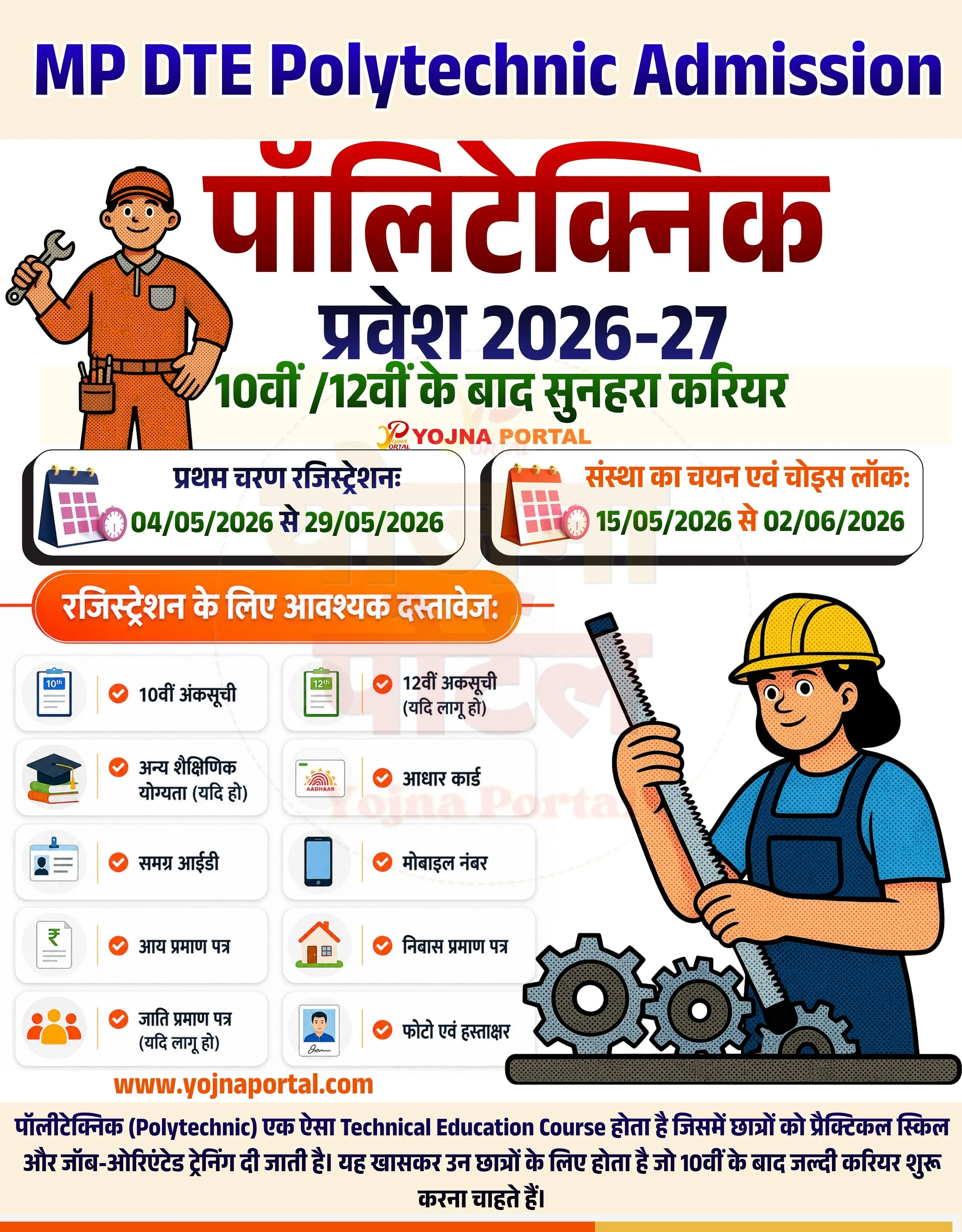
🚨 पॉलिटेक्निक प्रवेश 2026 शुरू!
📢 अभी करें रजिस्ट्रेशन 👉 www.yojnaportal.com
📢 Full Sharing (Hindi)
🚨 पॉलिटेक्निक प्रवेश 2026-27 शुरू

💰 10वीं / 12वीं के बाद सुनहरा करियर
📢 MP DTE द्वारा ऑनलाइन आवेदन प्रक्रिया शुरू

📄 मुख्य जानकारी:
✔ रजिस्ट्रेशन: 04/05/2026 से 29/05/2026
✔ चॉइस फिलिंग: 15/05/2026 से 02/06/2026
✔ सभी जरूरी दस्तावेज आवश्यक

👉 अधिक जानें: www.yojnaportal.com

#PolytechnicAdmission #MPDTE #DiplomaCourse
✨MP DTE Polytechnic 2026 Key Highlights
- Online registration process available
- Admission after 10th and 12th
- Choice filling and locking facility
- Technical diploma career opportunity
📌 Important Details of MP DTE Polytechnic 2026
- Registration Dates: 04 May 2026 to 29 May 2026
- Choice Filling & Locking: 15 May 2026 to 02 June 2026
- Applicable for MP DTE Polytechnic admission
- Candidates must complete registration before deadline
📖 About MP DTE Polytechnic 2026 Poster
MP DTE Polytechnic Admission is a diploma-level technical education program designed for students after 10th or 12th.
It provides practical skills and job-oriented training to help students start a technical career early.
🧠 MP DTE Polytechnic 2026 / Banner Generation Prompt
Create a high-resolution government-style infographic poster in vertical format (approx. 1000x1280).

Background:
Use a clean light beige/off-white background with a subtle soft gradient. Maintain a minimal, clean UI style.

Top Section:
At the very top, place a bold English heading in dark blue color:
"MP DTE Polytechnic Admission"
Font: Bold, modern sans-serif, सरकारी style, uppercase.

Below it, place a very large Hindi title in red color:
"पॉलीटेक्निक"
Font: Extra bold, thick Hindi font, केंद्र में aligned.

Under that, place a secondary Hindi heading in dark blue:
"प्रवेश 2026-27"

Below that, add a green line in bold Hindi text:
"10वीं /12वीं के बाद सुनहरा करियर"

Center area also includes a small logo text:
"YOJNA PORTAL" in orange/red tone.

Left Side Illustration:
Add a cartoon-style mechanic/worker character wearing orange uniform and cap, holding a wrench. Style should be flat vector with black outlines and slight dot shading.

Middle Section (Important Dates Cards):
Create two rounded rectangular cards with soft shadow and white background:

Left Card:
Include a small calendar icon.
Text in Hindi:
"प्रथम चरण रजिस्ट्रेशन:"
Below it in green:
"04/05/2026 से 29/05/2026"

Right Card:
Include a similar calendar icon.
Text:
"संस्था का चयन एवं चॉइस लॉक:"
Below in green:
"15/05/2026 से 02/06/2026"

Cards should have rounded corners, soft drop shadows, and be horizontally aligned.

Documents Section:
Below cards, add an orange rounded header bar with white bold Hindi text:
"रजिस्ट्रेशन के लिए आवश्यक दस्तावेज:"

Under this, create a grid of rounded white cards (2-column layout), each with soft shadows.

Each card contains:

Left: small icon (document, Aadhaar, phone, house, certificate, etc.)
Right: Hindi text in bold black

Items:
✔ 10वीं अंकसूची
✔ 12वीं अंकसूची (यदि लागू हो)
✔ अन्य शैक्षिणिक योग्यता (यदि हो)
✔ आधार कार्ड
✔ समग्र आईडी
✔ मोबाइल नंबर
✔ आय प्रमाण पत्र
✔ निवास प्रमाण पत्र
✔ जाति प्रमाण पत्र (यदि लागू हो)
✔ फोटो एवं हस्ताक्षर

Icons must be simple flat style with soft colors.

Right Side Illustration:
Add a larger cartoon female worker wearing yellow helmet and blue outfit, holding a measuring scale. At bottom near her, place mechanical gear graphics (3 gears).

Bottom Section:
Add footer text in orange:
"www.yojnaportal.com
"

Below that, add a paragraph in Hindi in small font:
"पॉलीटेक्निक (Polytechnic) एक ऐसा Technical Education Course होता है जिसमें छात्रों को प्रैक्टिकल स्किल और जॉब-ओरिएंटेड ट्रेनिंग दी जाती है। यह खासकर उन छात्रों के लिए होता है जो 10वीं के बाद जल्दी करियर शुरू करना चाहते हैं।"

Typography & Style:

Use bold Hindi fonts for headings
Clean sans-serif for English
Soft shadows under cards
Rounded UI elements
Balanced spacing and alignment

Color Palette:

Red (#d32f2f) for main Hindi title
Blue (#1a237e) for headings
Green (#2e7d32) for dates
Orange gradient (#ff6f00 to #ff9800) for section header
White cards with light grey shadows

Overall:
Modern, clean infographic design with government scheme look, balanced layout, and clear readability.
WhatsApp Telegram YouTube Facebook Instagram X (Twitter)